

- 0
- 0
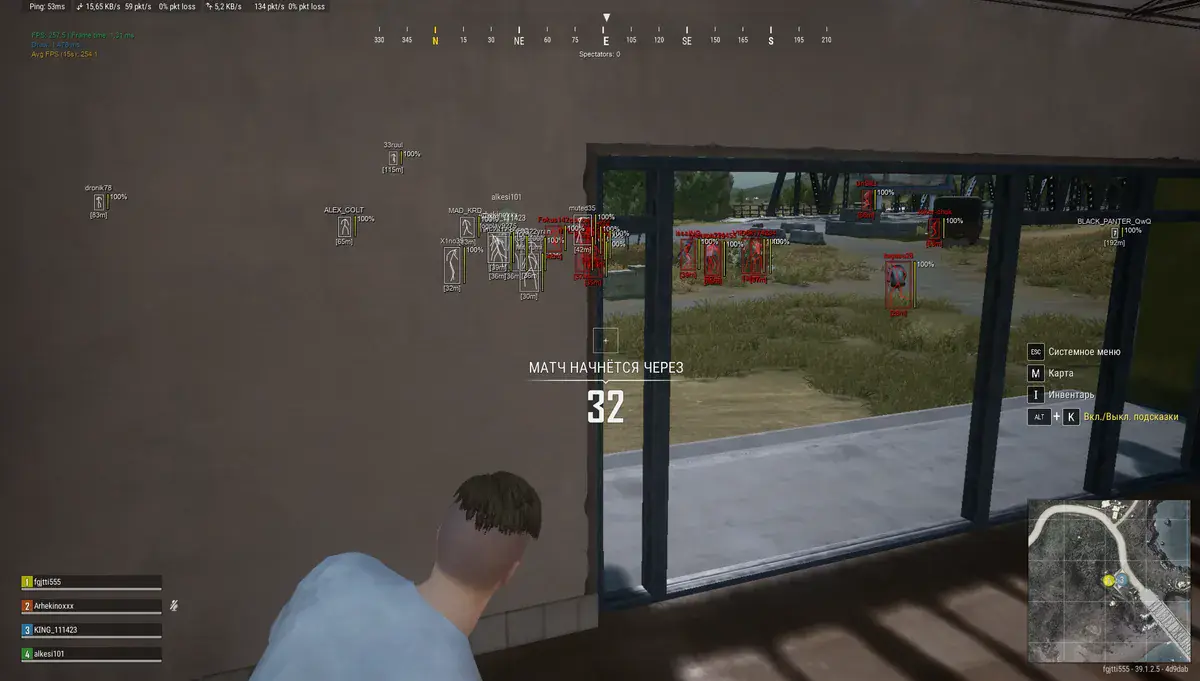

VENGEANCE — ПРИВАТНЫЙ ЧИТ ДЛЯ PUBG
СИСТЕМНЫЕ ТРЕБОВАНИЯ
Игра: Pubg
Клиент: In-game
Античит: BattleEye
Процессор: Intel | AMD
ОС: Windows 10 | Windows 11
Режим окна: All
Спуфер: Встроенный
Статус: UNDETECTED
— LEGIT —
Aim Mouse - AimBot's main switch. Activates standard auto-aim.
Aim-Bot keybind - A key for activating AimBot. Aiming only works while holding this key, making it controlled and natural.
Crosshair - Enables the display of a static crosshair in the center of the screen.
Smoothing - The smoothing strength of the crosshair. High values create a smooth, human-like movement, rather than sharp, robotic jerks. This is a key setting for legitness.
AimBone - Aiming bone selection menu.
Head - Head (maximum damage, high risk).
Neck - Neck (good balance of damage and stealth).
Pelvis - Pelvis (lower damage, but a larger impact area and stability).
================================================
— VISUALS —
Visible Check - Visibility check. The basis of legitimacy. Displays information only about enemies you can see right now (not through walls).
HealthBar - Enables the health bar display to show the player's health.
Box Type - Select the type of box displayed around the target.
Bone - Enables the display of the enemy's skeleton.
Names - Displays in-game nicknames above players' heads.
Distance - Shows the distance to the target in meters.
StreamProof - Allows you to hide software from all streaming/recording applications or bypass checks.
==================================================
Palette:
Color Name - Player nickname color.
Color Distance - Distance text color.
Color Bone - Bone color.
Color Box - Box color.
Color Fov - AimBot's field of view color.
Color Crosshair - Static crosshair color.
===================================================
Save Config:
Save Config - Save current settings to a file.
Load/Unload - Load or unload a previously saved configuration.
Aim Mouse - AimBot's main switch. Activates standard auto-aim.
Aim-Bot keybind - A key for activating AimBot. Aiming only works while holding this key, making it controlled and natural.
Crosshair - Enables the display of a static crosshair in the center of the screen.
Smoothing - The smoothing strength of the crosshair. High values create a smooth, human-like movement, rather than sharp, robotic jerks. This is a key setting for legitness.
AimBone - Aiming bone selection menu.
Head - Head (maximum damage, high risk).
Neck - Neck (good balance of damage and stealth).
Pelvis - Pelvis (lower damage, but a larger impact area and stability).
================================================
— VISUALS —
Visible Check - Visibility check. The basis of legitimacy. Displays information only about enemies you can see right now (not through walls).
HealthBar - Enables the health bar display to show the player's health.
Box Type - Select the type of box displayed around the target.
Bone - Enables the display of the enemy's skeleton.
Names - Displays in-game nicknames above players' heads.
Distance - Shows the distance to the target in meters.
StreamProof - Allows you to hide software from all streaming/recording applications or bypass checks.
==================================================
Palette:
Color Name - Player nickname color.
Color Distance - Distance text color.
Color Bone - Bone color.
Color Box - Box color.
Color Fov - AimBot's field of view color.
Color Crosshair - Static crosshair color.
===================================================
Save Config:
Save Config - Save current settings to a file.
Load/Unload - Load or unload a previously saved configuration.
СТОИМОСТЬ И ПОКУПКА
КУПИТЬ ТУТ: STAGE-SERVICES.SPACE
Прямые ссылки для оплаты:
1 День — 350 Р
7 Дней — 1500 Р
30 Дней — 3000 Р
КОНТАКТЫ ДЛЯ СВЯЗИ
Telegram: @stageservices


