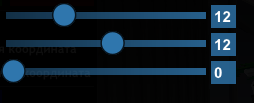
function imgui.CustomSlider(str_id, value, min, max, sformat, width)
    local width = width or 100
    local DL = imgui.GetWindowDrawList()
    local p = imgui.GetCursorScreenPos()

    -- Инициализация состояния слайдера
    UI_CUSTOM_SLIDER = UI_CUSTOM_SLIDER or {}
    UI_CUSTOM_SLIDER[str_id] = UI_CUSTOM_SLIDER[str_id] or {
        active = false,
        hovered = false,
        start = 0,
        smooth_value = value[0]  -- Всегда храним плавное значение для анимации
    }

    -- Создаем невидимую кнопку для взаимодействия
    imgui.InvisibleButton(str_id, imgui.ImVec2(width, 20))
    local isActive, isHovered = imgui.IsItemActive(), imgui.IsItemHovered()
    UI_CUSTOM_SLIDER[str_id].active = isActive
    UI_CUSTOM_SLIDER[str_id].hovered = isHovered

    -- Управление активными слайдерами
    if isActive then
        if imgui.GetIO().KeyAlt then
            alt_active_slider_id = str_id
        else
            active_slider_id = str_id
        end
    else
        if active_slider_id == str_id then active_slider_id = nil end
        if alt_active_slider_id == str_id and not imgui.GetIO().KeyAlt then alt_active_slider_id = nil end
    end

    -- Определяем тип значения (целое или дробное)
    local isInteger = (math.floor(min) == min) and (math.floor(max) == max)
    local step = (max - min) / (width * (isInteger and 10 or 80))

    -- Обработка ввода
    local isAltPressed = imgui.GetIO().KeyAlt
    local mouseDown = imgui.IsMouseDown(0)

    if ((str_id == active_slider_id and not isAltPressed) or
        (str_id == alt_active_slider_id and isAltPressed)) and mouseDown then

        local mousePos = imgui.GetMousePos()
        local delta = imgui.GetIO().MouseDelta.x

        if isAltPressed then
            -- Плавное изменение при зажатом Alt
            UI_CUSTOM_SLIDER[str_id].smooth_value = UI_CUSTOM_SLIDER[str_id].smooth_value + delta * step
            UI_CUSTOM_SLIDER[str_id].smooth_value = math.max(min, math.min(max, UI_CUSTOM_SLIDER[str_id].smooth_value))
            value[0] = isInteger and math.floor(UI_CUSTOM_SLIDER[str_id].smooth_value + 0.5) or UI_CUSTOM_SLIDER[str_id].smooth_value
        else
            -- Прямое перетаскивание
            if mousePos.x - p.x >= 0 and mousePos.x - p.x <= width then
                UI_CUSTOM_SLIDER[str_id].smooth_value = min + (max - min) * (mousePos.x - p.x) / width
                UI_CUSTOM_SLIDER[str_id].smooth_value = math.max(min, math.min(max, UI_CUSTOM_SLIDER[str_id].smooth_value))
                value[0] = isInteger and math.floor(UI_CUSTOM_SLIDER[str_id].smooth_value + 0.5) or UI_CUSTOM_SLIDER[str_id].smooth_value
            end
        end
    else
        -- Плавное возвращение к актуальному значению, когда слайдер не активен
        if math.abs(UI_CUSTOM_SLIDER[str_id].smooth_value - value[0]) > 0.001 then
            UI_CUSTOM_SLIDER[str_id].smooth_value = UI_CUSTOM_SLIDER[str_id].smooth_value + (value[0] - UI_CUSTOM_SLIDER[str_id].smooth_value) * 0.3
        else
            UI_CUSTOM_SLIDER[str_id].smooth_value = value[0]
        end
    end

    -- Визуализация слайдера (всегда используем smooth_value для позиции круга)
    local posCircleX = p.x + 7.5 + (width - 10) * (UI_CUSTOM_SLIDER[str_id].smooth_value - min) / (max - min)

    -- Цвета
    local eCol = imgui.GetStyle().Colors[imgui.Col.FrameBg]
    local brightness = isHovered and 0.05 or 0
    local triangleColor = imgui.ImVec4(
        eCol.x + brightness,
        eCol.y + brightness,
        eCol.z + brightness,
        1.0
    )

    -- Рисуем полосу слайдера
    if (str_id == active_slider_id and isAltPressed) or (str_id == alt_active_slider_id and isAltPressed) then
        -- Стиль для точной настройки (Alt)
        DL:AddRectFilled(
            imgui.ImVec2(p.x, p.y + 7),
            imgui.ImVec2(p.x + width, p.y + 14),
            imgui.GetColorU32Vec4(imgui.GetStyle().Colors[imgui.Col.Button])
        )

        -- Стрелки для индикации точной настройки
        local arrowSize, halfArrowSize, midY = 10, 5, p.y + 10
        DL:AddTriangleFilled(
            imgui.ImVec2(p.x, midY - halfArrowSize),
            imgui.ImVec2(p.x + arrowSize, midY),
            imgui.ImVec2(p.x, midY + halfArrowSize),
            imgui.GetColorU32Vec4(triangleColor)
        )
        DL:AddTriangleFilled(
            imgui.ImVec2(p.x + width, midY - halfArrowSize),
            imgui.ImVec2(p.x + width - arrowSize, midY),
            imgui.ImVec2(p.x + width, midY + halfArrowSize),
            imgui.GetColorU32Vec4(triangleColor)
        )
    else
        -- Обычный стиль слайдера
        DL:AddRectFilledMultiColor(
            imgui.ImVec2(p.x, p.y + 7),
            imgui.ImVec2(p.x + width, p.y + 14),
            imgui.GetColorU32Vec4(imgui.GetStyle().Colors[imgui.Col.Button]),
            imgui.GetColorU32Vec4(imgui.GetStyle().Colors[imgui.Col.FrameBg]),
            imgui.GetColorU32Vec4(imgui.GetStyle().Colors[imgui.Col.FrameBg]),
            imgui.GetColorU32Vec4(imgui.GetStyle().Colors[imgui.Col.Button])
        )

        -- Ползунок (увеличиваем визуальный размер)
        local circleRadius = 12  -- Увеличиваем радиус для лучшей видимости
        DL:AddCircleFilled(
            imgui.ImVec2(posCircleX, p.y + 10),
            circleRadius,
            imgui.GetColorU32Vec4(triangleColor),
            32
        )
        DL:AddCircle(
            imgui.ImVec2(posCircleX, p.y + 10),
            circleRadius,
            imgui.GetColorU32Vec4(imgui.GetStyle().Colors[imgui.Col.WindowBg]),
            32,
            1.5  -- Увеличиваем толщину обводки
        )
    end

    -- Отображение значения
    DL:AddText(
        imgui.ImVec2(p.x + width + 10, p.y),
        imgui.GetColorU32Vec4(imgui.GetStyle().Colors[imgui.Col.Text]),
        string.format(sformat, value[0])
    )

    return isActive
end