

- 0
- 0


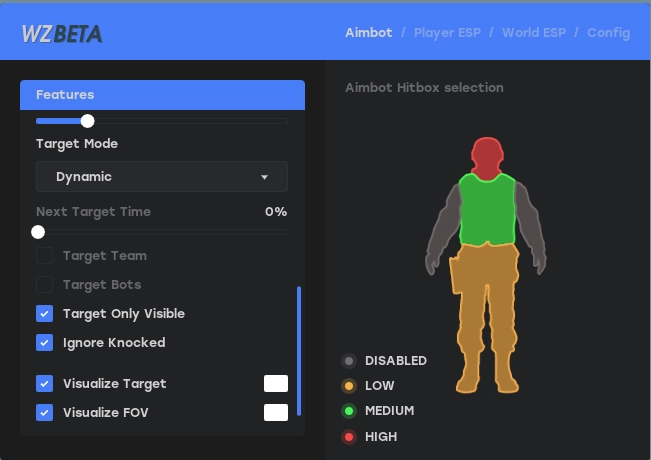
IGNITE — ПРИВАТНЫЙ ЧИТ ДЛЯ ARC RAIDERS
СИСТЕМНЫЕ ТРЕБОВАНИЯ
Игра: Arc Raiders
Античит: EAC
Процессор: Intel & AMD (Xeon & AMD FX not supported)
ОС: Windows 10 x64 (20H2 / 21H1 / 21H2 / 22H2), Windows 11 (22H2 / 23H2)
Режим окна: Window / Full Screen in Window
Спуфер: Нет
Статус: UNDETECTED
— AIMBOT —
Targeting Options
Enabled — main aimbot toggle
Speed — adjustable aimbot speed (0–100%)
Field of View — targeting angle (0–180°)
Max Distance — maximum targeting range (0–500 m)
Retarget Time — delay before switching targets (0–1000 ms)
Detach Time — time before releasing target (0–1000 ms)
Filtering Options
Filter Team — ignore teammates
Filter Invisible — ignore invisible targets
Draw Aimbot FOV — display FOV radius with customizable color
Hitbox Selection
Configurable body part targeting
— TRIGGERBOT —
Targeting Options
Enabled — triggerbot main toggle
Hitbox Expansion — adjustable hitbox size (0–100%)
Retarget Time — delay before switching targets (0–1000 ms)
Filtering Options
Filter Team — ignore teammates
Filter Invisible — ignore invisible targets
Hitbox Selection
Selectable body parts for trigger activation
— PLAYER ESP —
Player Types
Enemy
Team
Bot
Main ESP Settings
Max Distance — render distance (0–500 m)
Box — player boxes with color customization (not for sleepers)
Head Dot — head indicator with color customization
View Angles — shows player view direction
Skeleton — bone ESP with color customization
Out of FOV Arrows — off-screen player indicators
Distance — distance display with movable position
Name — player name display with movable position
Visible — visibility indicator (requires occlusion enabled)
Draggable ESP System
Fully customizable ESP layout with drag-and-drop positioning
— CONFIG —
Configuration Management
Config Name Input — enter new config name
Add Config — create new configuration
Config List — list of saved configs
Action Buttons
Load — load selected config
Save — save current settings
Delete — remove selected config
Clear — reset all settings
Misc Settings
Overlay FPS — overlay refresh rate (30–500 FPS)
Developer Mode — developer features (debug mode only)
Targeting Options
Enabled — main aimbot toggle
Speed — adjustable aimbot speed (0–100%)
Field of View — targeting angle (0–180°)
Max Distance — maximum targeting range (0–500 m)
Retarget Time — delay before switching targets (0–1000 ms)
Detach Time — time before releasing target (0–1000 ms)
Filtering Options
Filter Team — ignore teammates
Filter Invisible — ignore invisible targets
Draw Aimbot FOV — display FOV radius with customizable color
Hitbox Selection
Configurable body part targeting
— TRIGGERBOT —
Targeting Options
Enabled — triggerbot main toggle
Hitbox Expansion — adjustable hitbox size (0–100%)
Retarget Time — delay before switching targets (0–1000 ms)
Filtering Options
Filter Team — ignore teammates
Filter Invisible — ignore invisible targets
Hitbox Selection
Selectable body parts for trigger activation
— PLAYER ESP —
Player Types
Enemy
Team
Bot
Main ESP Settings
Max Distance — render distance (0–500 m)
Box — player boxes with color customization (not for sleepers)
Head Dot — head indicator with color customization
View Angles — shows player view direction
Skeleton — bone ESP with color customization
Out of FOV Arrows — off-screen player indicators
Distance — distance display with movable position
Name — player name display with movable position
Visible — visibility indicator (requires occlusion enabled)
Draggable ESP System
Fully customizable ESP layout with drag-and-drop positioning
— CONFIG —
Configuration Management
Config Name Input — enter new config name
Add Config — create new configuration
Config List — list of saved configs
Action Buttons
Load — load selected config
Save — save current settings
Delete — remove selected config
Clear — reset all settings
Misc Settings
Overlay FPS — overlay refresh rate (30–500 FPS)
Developer Mode — developer features (debug mode only)
СТОИМОСТЬ И ПОКУПКА
КУПИТЬ ТУТ: STAGE-SERVICES.SPACE
Прямые ссылки для оплаты:
1 День — 1005 Р
3 Дня — 1399 Р
7 Дней — 2350 Р
30 Дней — 5025 Р
КОНТАКТЫ ДЛЯ СВЯЗИ
Telegram: @stageservices
methodcheats


