

- 0
- 0

🔷 715 TEAM | DAYZ 🔷
━━━━━━━━━━━━━━━━━━━━━━━━━━━━━━
🖥 ТРЕБОВАНИЯ
▪ Игра: DayZ
▪ Статус: UNDETECTED
◈ ОСНОВНЫЕ ФУНКЦИИ
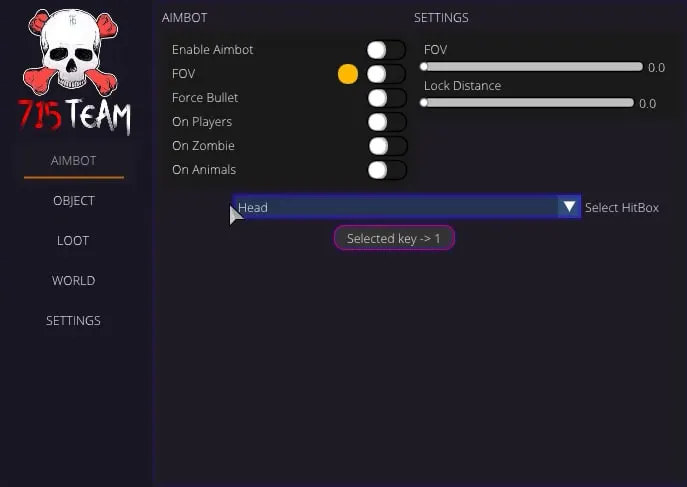
▪ AimBot
▪ Enable AimBot - enable automatic targeting of players
▪ FOV - enable FOV display/Adjust FOV color
▪ Force Bullet - enable bypass of 50m bullet range limitation
▪ On Players - enable aimbot triggering on players
▪ On Zombie - enable aimbot triggering on zombies
▪ On Animals - enable aimbot triggering on animals
◈ ============SETTINGS============
▪ FOV - adjust FOV radius
▪ Lock Distance - set the distance for the aimbot to trigger
▪ Select HitBox[HEAD, NECK, CHEST, PELVIS] - set the bone to which the targeting will be made [HEAD, NECK, TORSO, PELVIS]
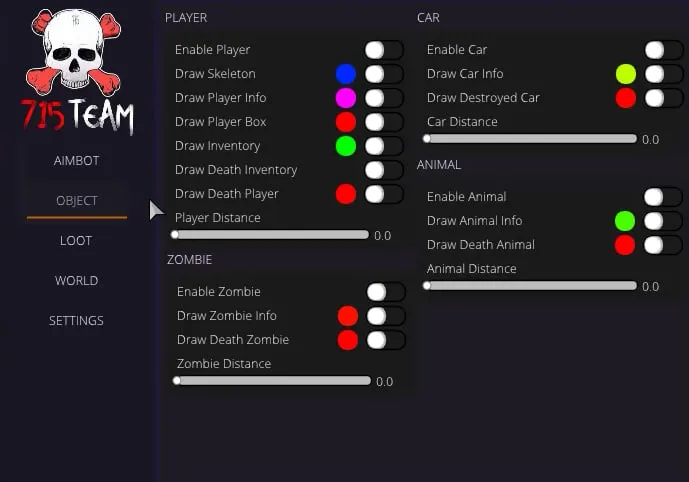
▪ Object
▪ ============Player============
▪ Enable Player - enable display of players
▪ Draw Skeleton - enable display of skeletons on players/Customize the color of the displayed skeleton
▪ Draw Player Info - enable display of player information/Customize color of player information
▪ Draw Player Box - enable display of box on players/Customize color of displayed box
▪ Draw Inventory - enable display of player inventory/Customize text color
▪ Draw Death Inventory - enable display of dead players inventory/Customize text color
▪ Draw Death Player- enable display of dead players/Customize text color of dead players
▪ Player Distance - adjust the distance to the displayed player
▪ ============Car============
▪ Enable Car - enable transport display
▪ Draw Car Info - enable display of transport information/Customize transport information color
▪ Draw Destroyed Car - enable display of destroyed transport/Customize color of information about destroyed transport
▪ Car Distance - set the distance to the displayed transport
▪ ============Zombie============
▪ Enable Zombie - enable display of infected
▪ Draw Zombie Info - enable display of information about infected/Customize the text color of information about infected
▪ Draw Death Zombie - enable display of dead infected/Customize color of dead infected information
▪ Zombie Distance - adjust distance to displayed infected
▪ ============Animal============
▪ Enable Animal - enable display of animals
▪ Draw Animal Info - enable display of animal information/Customize color of animal information text
▪ Draw Death Animal - enable display of dead animals/Customize color of dead animal information
▪ Animal Distance - adjust the distance to the displayed animals
▪ Loot
▪ Enable Loot - enable loot display
▪ Draw Loot Info - enable display of loot information
▪ Draw Loot Quality - enable display of information about the quality of the item. The display depends on the selected FOV and is displayed only within its radius when hovering over the item.
▪ ============Loot Filter============
▪ Clothes - enable display of clothes/Customize clothes text color
▪ Food & Drink - enable food display/Customize food text color
▪ Weapons - enable weapon display/Customize weapon text color
▪ Ammunation - enable ammo display/Customize ammo text color
▪ Attachments - enable display of add-ons/Customize add-on text color
▪ Medical - enable display of medicine/Customize medicine text color
▪ Vehicle Parts - enable display of auto parts/Customize auto parts text color
▪ Craft - enable display of construction items/Customize text color of construction items
▪ Tools - enable display of tools/Customize text color of tools
▪ Containers - enable display of containers/Customize container text color
▪ Others - enable display of items that are not filtered/Customize text color of items that are not filtered
▪ World - мир
▪ Enable Countries - enable display of cities
▪ Draw My Coords - enable display of your character's position
▪ ============Friends============
▪ The table displays all players present on the server. The table displays the nicknames of the players. When selecting a player, his information text changes to green and his nickname gets the addition FRIEND. It is possible to filter by entering a specific nickname.
◈ ============MISC============
▪ No Grass - disable grass display in game. Increases FPS
▪ Always Days - change of game time
▪ ThreadPersonView - enable third person view on servers where it is blocked
▪ No Clip (CTRL + P) - enable player flight on the map. Further enabling and disabling occurs by pressing the key combination CTRL + P. Allows you to pick up loot from any point up to 5m, kill players at any distance with grenades and mines, and also loot corpses at any distance
▪ Day Switch - setting for the Always Days function that allows you to adjust the game time (from night to day)
▪ Settings
▪ ============Player============
▪ Tick Player Skelet - adjust the thickness of the displayed skeleton
▪ Tick Player Info - adjust the font size of the text of the displayed information about players
▪ Tick Player Box - adjust the thickness of the displayed box
▪ Tick Player Death - adjust the font size of the text of the displayed information about dead players
▪ ============Car============
▪ Tick Car Info - adjust the font size of the text of the displayed transport information
▪ Tick Car Destroyed - adjust the font size of the text of the displayed information about the destroyed vehicle
◈ ============ZOMBIE============
▪ Tick Zombie Info - adjust the font size of the text of the displayed information about infected
▪ Tick Zombie Death - adjust the font size of the text of the displayed information about dead infected
◈ ============ANIMAL============
▪ Tick Animal Info - adjust the font size of the text of the displayed information about animals
▪ Tick Animal Death - adjust the font size of the text of the displayed information about dead animals
▪ ============Loot============
▪ Tick Loot Info - adjust the font size of the text of the displayed loot information
▪ AimBot
▪ Enable AimBot - enable automatic targeting of players
▪ FOV - enable FOV display/Adjust FOV color
▪ Force Bullet - enable bypass of 50m bullet range limitation
▪ On Players - enable aimbot triggering on players
▪ On Zombie - enable aimbot triggering on zombies
▪ On Animals - enable aimbot triggering on animals
◈ ============SETTINGS============
▪ FOV - adjust FOV radius
▪ Lock Distance - set the distance for the aimbot to trigger
▪ Select HitBox[HEAD, NECK, CHEST, PELVIS] - set the bone to which the targeting will be made [HEAD, NECK, TORSO, PELVIS]
▪ Object
▪ ============Player============
▪ Enable Player - enable display of players
▪ Draw Skeleton - enable display of skeletons on players/Customize the color of the displayed skeleton
▪ Draw Player Info - enable display of player information/Customize color of player information
▪ Draw Player Box - enable display of box on players/Customize color of displayed box
▪ Draw Inventory - enable display of player inventory/Customize text color
▪ Draw Death Inventory - enable display of dead players inventory/Customize text color
▪ Draw Death Player- enable display of dead players/Customize text color of dead players
▪ Player Distance - adjust the distance to the displayed player
▪ ============Car============
▪ Enable Car - enable transport display
▪ Draw Car Info - enable display of transport information/Customize transport information color
▪ Draw Destroyed Car - enable display of destroyed transport/Customize color of information about destroyed transport
▪ Car Distance - set the distance to the displayed transport
▪ ============Zombie============
▪ Enable Zombie - enable display of infected
▪ Draw Zombie Info - enable display of information about infected/Customize the text color of information about infected
▪ Draw Death Zombie - enable display of dead infected/Customize color of dead infected information
▪ Zombie Distance - adjust distance to displayed infected
▪ ============Animal============
▪ Enable Animal - enable display of animals
▪ Draw Animal Info - enable display of animal information/Customize color of animal information text
▪ Draw Death Animal - enable display of dead animals/Customize color of dead animal information
▪ Animal Distance - adjust the distance to the displayed animals
▪ Loot
▪ Enable Loot - enable loot display
▪ Draw Loot Info - enable display of loot information
▪ Draw Loot Quality - enable display of information about the quality of the item. The display depends on the selected FOV and is displayed only within its radius when hovering over the item.
▪ ============Loot Filter============
▪ Clothes - enable display of clothes/Customize clothes text color
▪ Food & Drink - enable food display/Customize food text color
▪ Weapons - enable weapon display/Customize weapon text color
▪ Ammunation - enable ammo display/Customize ammo text color
▪ Attachments - enable display of add-ons/Customize add-on text color
▪ Medical - enable display of medicine/Customize medicine text color
▪ Vehicle Parts - enable display of auto parts/Customize auto parts text color
▪ Craft - enable display of construction items/Customize text color of construction items
▪ Tools - enable display of tools/Customize text color of tools
▪ Containers - enable display of containers/Customize container text color
▪ Others - enable display of items that are not filtered/Customize text color of items that are not filtered
▪ World - мир
▪ Enable Countries - enable display of cities
▪ Draw My Coords - enable display of your character's position
▪ ============Friends============
▪ The table displays all players present on the server. The table displays the nicknames of the players. When selecting a player, his information text changes to green and his nickname gets the addition FRIEND. It is possible to filter by entering a specific nickname.
◈ ============MISC============
▪ No Grass - disable grass display in game. Increases FPS
▪ Always Days - change of game time
▪ ThreadPersonView - enable third person view on servers where it is blocked
▪ No Clip (CTRL + P) - enable player flight on the map. Further enabling and disabling occurs by pressing the key combination CTRL + P. Allows you to pick up loot from any point up to 5m, kill players at any distance with grenades and mines, and also loot corpses at any distance
▪ Day Switch - setting for the Always Days function that allows you to adjust the game time (from night to day)
▪ Settings
▪ ============Player============
▪ Tick Player Skelet - adjust the thickness of the displayed skeleton
▪ Tick Player Info - adjust the font size of the text of the displayed information about players
▪ Tick Player Box - adjust the thickness of the displayed box
▪ Tick Player Death - adjust the font size of the text of the displayed information about dead players
▪ ============Car============
▪ Tick Car Info - adjust the font size of the text of the displayed transport information
▪ Tick Car Destroyed - adjust the font size of the text of the displayed information about the destroyed vehicle
◈ ============ZOMBIE============
▪ Tick Zombie Info - adjust the font size of the text of the displayed information about infected
▪ Tick Zombie Death - adjust the font size of the text of the displayed information about dead infected
◈ ============ANIMAL============
▪ Tick Animal Info - adjust the font size of the text of the displayed information about animals
▪ Tick Animal Death - adjust the font size of the text of the displayed information about dead animals
▪ ============Loot============
▪ Tick Loot Info - adjust the font size of the text of the displayed loot information
━━━━━━━━━━━━━━━━━━━━━━━━━━━━━━
🌐 САЙТ
METHODCHEATS.TOP
Ссылки на оплату:
RU регион:
▸ 1 День — 300 руб.
▸ 7 Дней — 1100 руб.
▸ 30 Дней — 2050 руб.
EU / Global:
▸ 1 Day — $11
▸ 7 Days — $50
▸ 30 Days — $79
━━━━━━━━━━━━━━━━━━━━━━━━━━━━━━
📱 ПОДДЕРЖКА
Telegram: @methodcheats


