

- 0
- 0
🔷 CROOKED ARM'S BATTLEFIELD 6 | REDSEC | BATTLEFIELD 6 🔷
━━━━━━━━━━━━━━━━━━━━━━━━━━━━━━
🖥 ТРЕБОВАНИЯ
▪ Игра: Battlefield 6
▪ Клиент: Steam / EA / Epic Games
▪ Античит: EAAC
▪ Процессор: Intel / AMD
▪ ОС: Windows 10 & 11 (x64)
▪ Режим окна: Windowed
▪ Спуфер: Compatibility is not guaranteed when using third-party spoofers.
▪ USB: Да
▪ Стрим-режим: Да (Hidden on videos, screenshots, and screen sharing)
▪ Статус: UNDETECTED
◈ ОСНОВНЫЕ ФУНКЦИИ
▪ Visual
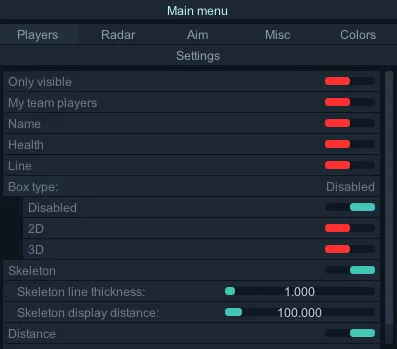
▪ Only Visible: Show only visible players
▪ My Team Players: Show teammates
▪ Name: Show player names
▪ Health: Show player health
▪ Line: Show snaplines to players
▪ Box Type: Select box style
▪ Disabled: Turn off player boxes
▪ Box 2D: Display 2D box around players
▪ Box 3D: Display 3D box around players
▪ Skeleton: Show player skeletons
▪ Skeleton Line Thickness: Set skeleton line thickness
▪ Skeleton Display Distance: Set max render distance for skeletons
▪ Distance: Show numerical distance
▪ Display Distance: Set max render distance for player ESP
▪ Radar
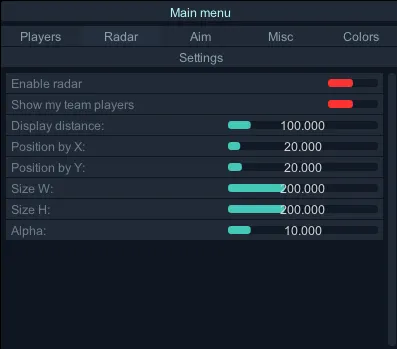
▪ Enable Radar: Turn on 2D Radar
▪ Show My Team Players: Show teammates on radar
▪ Display Distance: Set radar scanning range
▪ Position by X: Horizontal position
▪ Position by Y: Vertical position
▪ Size by W: Radar width
▪ Size by H: Radar height
▪ Alpha: Radar opacity/transparency
▪ Aim
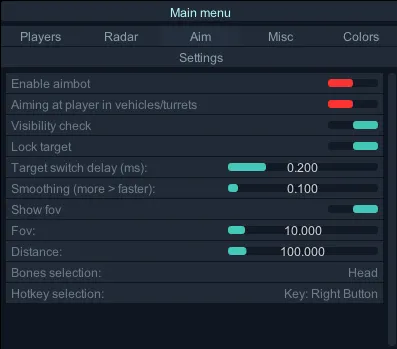
▪ Enable Aimbot: Turn on Aimbot (Prediction is enabled by default)
▪ Aiming at Player in Vehicles/Turrets: Enable aimbot for enemies in vehicles or manned turrets
▪ Aiming at Knocked Players: Enable aimbot for downed/knocked enemies
▪ Visibility Check: Ensure aimbot only targets visible enemies
▪ Lock Target: Lock onto the current target
▪ Target Switch Delay (ms): Delay before switching to a new target
▪ Smoothing (more > faster): Set aimbot speed/smoothness (Higher value = Faster aim)
▪ Show FOV: Display Aimbot FOV circle
▪ FOV: Set Aimbot radius
▪ Distance: Set max Aimbot range
▪ Bones Selection: Select body part to aim at
▪ Head, Neck, Left Elbow, Right Elbow, Body, Pelvis, Left Knee, Right Knee
▪ Hotkey Selection: Set Aimbot activation key (Key must be held down to work)
▪ Colors
▪ Change Color if Player is Visible: Toggle different colors for visible vs. hidden enemies
▪ Invisible Player Color: Set color for enemies behind walls
▪ Visible Player Color: Set color for visible enemies
▪ Player Color: Set general player color
▪ My Team Players Color: Set teammate color
▪ Target Player Color: Set color for the player currently being targeted by aimbot
▪ Misc
▪ Show Active Enemy Vehicles & Turrets: ESP for vehicles and turrets
▪ 3D Box: Show 3D box
▪ Health: Show health
▪ Name & Distance: Show name and distance
▪ Display Distance: Set max render distance
▪ Vehicles & Turrets Color: Set color
▪ Draw Crosshair: Display screen crosshair
▪ Crosshair Color: Set crosshair color
▪ Settings
▪ Menu Opening Hotkey: Set key to toggle the menu (Default: "HOME")
▪ Visual
▪ Only Visible: Show only visible players
▪ My Team Players: Show teammates
▪ Name: Show player names
▪ Health: Show player health
▪ Line: Show snaplines to players
▪ Box Type: Select box style
▪ Disabled: Turn off player boxes
▪ Box 2D: Display 2D box around players
▪ Box 3D: Display 3D box around players
▪ Skeleton: Show player skeletons
▪ Skeleton Line Thickness: Set skeleton line thickness
▪ Skeleton Display Distance: Set max render distance for skeletons
▪ Distance: Show numerical distance
▪ Display Distance: Set max render distance for player ESP
▪ Radar
▪ Enable Radar: Turn on 2D Radar
▪ Show My Team Players: Show teammates on radar
▪ Display Distance: Set radar scanning range
▪ Position by X: Horizontal position
▪ Position by Y: Vertical position
▪ Size by W: Radar width
▪ Size by H: Radar height
▪ Alpha: Radar opacity/transparency
▪ Aim
▪ Enable Aimbot: Turn on Aimbot (Prediction is enabled by default)
▪ Aiming at Player in Vehicles/Turrets: Enable aimbot for enemies in vehicles or manned turrets
▪ Aiming at Knocked Players: Enable aimbot for downed/knocked enemies
▪ Visibility Check: Ensure aimbot only targets visible enemies
▪ Lock Target: Lock onto the current target
▪ Target Switch Delay (ms): Delay before switching to a new target
▪ Smoothing (more > faster): Set aimbot speed/smoothness (Higher value = Faster aim)
▪ Show FOV: Display Aimbot FOV circle
▪ FOV: Set Aimbot radius
▪ Distance: Set max Aimbot range
▪ Bones Selection: Select body part to aim at
▪ Head, Neck, Left Elbow, Right Elbow, Body, Pelvis, Left Knee, Right Knee
▪ Hotkey Selection: Set Aimbot activation key (Key must be held down to work)
▪ Colors
▪ Change Color if Player is Visible: Toggle different colors for visible vs. hidden enemies
▪ Invisible Player Color: Set color for enemies behind walls
▪ Visible Player Color: Set color for visible enemies
▪ Player Color: Set general player color
▪ My Team Players Color: Set teammate color
▪ Target Player Color: Set color for the player currently being targeted by aimbot
▪ Misc
▪ Show Active Enemy Vehicles & Turrets: ESP for vehicles and turrets
▪ 3D Box: Show 3D box
▪ Health: Show health
▪ Name & Distance: Show name and distance
▪ Display Distance: Set max render distance
▪ Vehicles & Turrets Color: Set color
▪ Draw Crosshair: Display screen crosshair
▪ Crosshair Color: Set crosshair color
▪ Settings
▪ Menu Opening Hotkey: Set key to toggle the menu (Default: "HOME")
━━━━━━━━━━━━━━━━━━━━━━━━━━━━━━
🌐 САЙТ
METHODCHEATS.TOP
Ссылки на оплату:
▸ 1 День — 400 руб.
▸ 7 Дней — 2300 руб.
▸ 31 — 3500 руб.
━━━━━━━━━━━━━━━━━━━━━━━━━━━━━━
📱 ПОДДЕРЖКА
Telegram: @methodcheats


