

- 0
- 0

🔷 MASON-RADAR | ALBION 🔷
━━━━━━━━━━━━━━━━━━━━━━━━━━━━━━
🖥 ТРЕБОВАНИЯ
▪ Игра: Albion
▪ Клиент: Official client / Steam
▪ Античит: In-game
▪ Процессор: Intel and AMD
▪ ОС: 10x64, versions (2004 / 20H2 / 21H1 / 21H2 / 22H2)
▪ Режим окна: Windowed or Borderless Windowed
▪ Стрим-режим: Нет
▪ Статус: UNDETECTED
◈ ОСНОВНЫЕ ФУНКЦИИ
▪ Main
▪ Show Resources: (Wood, stone, ore, etc.)
▪ Show Mobs
▪ Show Players
▪ Show NPCs
▪ Show Chests
▪ Show Mists
▪ Show Mounts
▪ Object Counter: Displays the count of objects on the radar broken down by type (CHEST, MOB, HARV, etc.)
▪ Distance Filter: Set minimum/maximum distance (objects outside this range are hidden)
▪ Sound Notifications: Alerts when detecting various object types (players, chests, resources)
▪ Nearest Object Tracker: Automatically detects and displays info about the object closest to the player
▪ Export Coordinates: Saves coordinates of all discovered objects to a text file (Hotkey: F3)
▪ Discovery History: Tracks history of found objects with timestamps
◈ HOTKEYS:
▪ F1: Menu
▪ F2: Save
▪ F3: Export coordinates
▪ Auto-Save Config: Automatically saves settings every 30 seconds
▪ Show Distance: Displays distance to radar objects in meters
▪ Player Proximity Warning: Sound alert when other players approach a set distance
▪ Object Grouping: Groups objects by type for easier analysis
▪ Direction Indicator: Shows direction on the radar
▪ Auto-Hide: Automatically hides objects outside the scan radius
▪ Detection Statistics: Tracks stats (Time of first/last detection, total count)
▪ Advanced Sound Alerts: Distinct sounds for different types (Chests, Resources, Players)
▪ Visual Indicators: Pulsing circles for high-value objects (Chests, Artifacts)
▪ Priority System: Sorts objects by importance (Chests = Highest priority)
▪ Object Caching: Optimizes performance
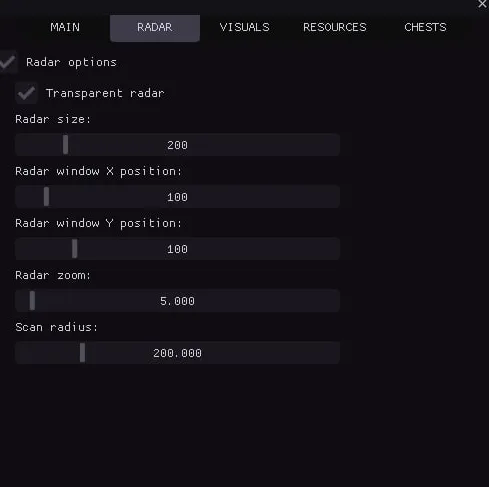
▪ Radar
▪ Radar Options
▪ Transparent Radar: Adjust opacity
▪ Radar Size
▪ Radar X Position
▪ Radar Y Position
▪ Radar Zoom: Zoom in/out
▪ Scan Radius: Set distance for object scanning
▪ Visuals Colors
▪ Mobs Color
▪ NPC Color
▪ Players Color
▪ Mounts Color
▪ Mists Color
▪ Resources Tier 1–8 Color: (Individual color settings for each tier)
▪ Chests Color
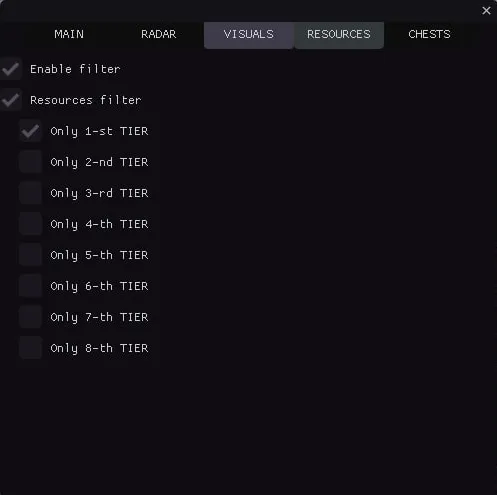
▪ Resources
▪ Enable Filter
▪ Resources Filter:
▪ Only Tier 1 Items
▪ Only Tier 2 Items
▪ Only Tier 3 Items
▪ Only Tier 4 Items
▪ Only Tier 5 Items
▪ Only Tier 6 Items
▪ Only Tier 7 Items
▪ Only Tier 8 Items
▪ Chests
▪ Chests Filter:
▪ Only Tier 1 Chests
▪ Only Tier 2 Chests
▪ Only Tier 3 Chests
▪ Only Tier 4 Chests
▪ Visual Effects
▪ Snaplines: Lines from radar center to objects for better visualization
▪ Movement Trails: Shows object movement paths with adjustable length
▪ Scan Zone: Visualizes the scanning area
▪ Color Gradients: Gradient coloring for objects
▪ Object Animations: Pulsing effects with adjustable speed
▪ Shadows: Depth effect under objects
▪ Glow Effects: Aura around objects
▪ Radar Grid: Coordinate grid for orientation
▪ Zone Boundaries: Visual radar borders with corner markers
▪ Directional Arrows: Pointers indicating object direction
▪ Object Icons: Unique icons for different types
▪ Gradient Lines: Lines with smooth color transitions
▪ Object Outlines: Contours with adjustable thickness
▪ Hover Highlight: Highlights objects when moused over
▪ Distance Rings: Concentric circles to visualize range
▪ Particle Effects: Particles around VIP objects (Chests, Artifacts)
▪ Visual Markers: Star markers for important objects
▪ Pulsating Effects: Object pulsation
▪ 3D Depth Effect: Visual depth for objects on radar
▪ Main
▪ Show Resources: (Wood, stone, ore, etc.)
▪ Show Mobs
▪ Show Players
▪ Show NPCs
▪ Show Chests
▪ Show Mists
▪ Show Mounts
▪ Object Counter: Displays the count of objects on the radar broken down by type (CHEST, MOB, HARV, etc.)
▪ Distance Filter: Set minimum/maximum distance (objects outside this range are hidden)
▪ Sound Notifications: Alerts when detecting various object types (players, chests, resources)
▪ Nearest Object Tracker: Automatically detects and displays info about the object closest to the player
▪ Export Coordinates: Saves coordinates of all discovered objects to a text file (Hotkey: F3)
▪ Discovery History: Tracks history of found objects with timestamps
◈ HOTKEYS:
▪ F1: Menu
▪ F2: Save
▪ F3: Export coordinates
▪ Auto-Save Config: Automatically saves settings every 30 seconds
▪ Show Distance: Displays distance to radar objects in meters
▪ Player Proximity Warning: Sound alert when other players approach a set distance
▪ Object Grouping: Groups objects by type for easier analysis
▪ Direction Indicator: Shows direction on the radar
▪ Auto-Hide: Automatically hides objects outside the scan radius
▪ Detection Statistics: Tracks stats (Time of first/last detection, total count)
▪ Advanced Sound Alerts: Distinct sounds for different types (Chests, Resources, Players)
▪ Visual Indicators: Pulsing circles for high-value objects (Chests, Artifacts)
▪ Priority System: Sorts objects by importance (Chests = Highest priority)
▪ Object Caching: Optimizes performance
▪ Radar
▪ Radar Options
▪ Transparent Radar: Adjust opacity
▪ Radar Size
▪ Radar X Position
▪ Radar Y Position
▪ Radar Zoom: Zoom in/out
▪ Scan Radius: Set distance for object scanning
▪ Visuals Colors
▪ Mobs Color
▪ NPC Color
▪ Players Color
▪ Mounts Color
▪ Mists Color
▪ Resources Tier 1–8 Color: (Individual color settings for each tier)
▪ Chests Color
▪ Resources
▪ Enable Filter
▪ Resources Filter:
▪ Only Tier 1 Items
▪ Only Tier 2 Items
▪ Only Tier 3 Items
▪ Only Tier 4 Items
▪ Only Tier 5 Items
▪ Only Tier 6 Items
▪ Only Tier 7 Items
▪ Only Tier 8 Items
▪ Chests
▪ Chests Filter:
▪ Only Tier 1 Chests
▪ Only Tier 2 Chests
▪ Only Tier 3 Chests
▪ Only Tier 4 Chests
▪ Visual Effects
▪ Snaplines: Lines from radar center to objects for better visualization
▪ Movement Trails: Shows object movement paths with adjustable length
▪ Scan Zone: Visualizes the scanning area
▪ Color Gradients: Gradient coloring for objects
▪ Object Animations: Pulsing effects with adjustable speed
▪ Shadows: Depth effect under objects
▪ Glow Effects: Aura around objects
▪ Radar Grid: Coordinate grid for orientation
▪ Zone Boundaries: Visual radar borders with corner markers
▪ Directional Arrows: Pointers indicating object direction
▪ Object Icons: Unique icons for different types
▪ Gradient Lines: Lines with smooth color transitions
▪ Object Outlines: Contours with adjustable thickness
▪ Hover Highlight: Highlights objects when moused over
▪ Distance Rings: Concentric circles to visualize range
▪ Particle Effects: Particles around VIP objects (Chests, Artifacts)
▪ Visual Markers: Star markers for important objects
▪ Pulsating Effects: Object pulsation
▪ 3D Depth Effect: Visual depth for objects on radar
━━━━━━━━━━━━━━━━━━━━━━━━━━━━━━
🌐 САЙТ
METHODCHEATS.TOP
Ссылки на оплату:
▸ 1 День — 199 руб.
▸ 7 Дней — 749 руб.
▸ 30 Дней — 1999 руб.
━━━━━━━━━━━━━━━━━━━━━━━━━━━━━━
📱 ПОДДЕРЖКА
Telegram: @methodcheats


